
Lesson
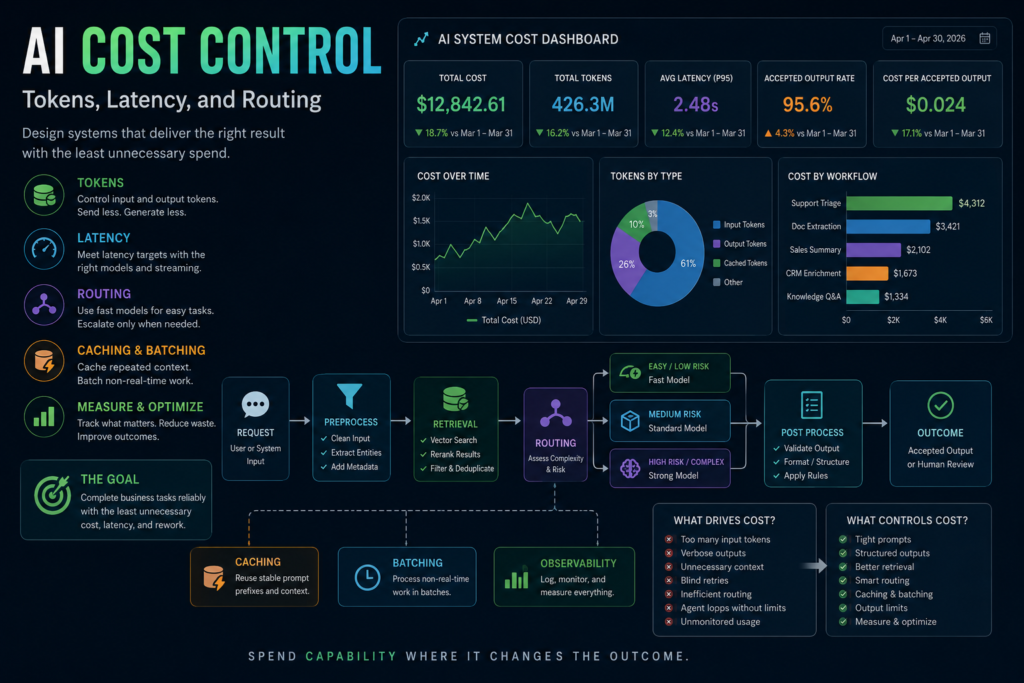
AI Cost Control in Production Systems: Tokens, Latency, and Routing
Learning Objectives
- Explain why AI cost control is a workflow-design problem, not just a pricing problem.
- Identify the main cost drivers in production AI systems, including tokens, output length, retries, context, model choice, tool calls, and human review.
- Build a practical token and latency budget for a real business workflow.
- Use routing, caching, batching, and prompt design to reduce waste without weakening quality.
- Measure cost per useful outcome instead of only cost per model call.
Prerequisites
A basic understanding of LLMs, tokens, prompts, structured outputs, and model selection will help. You do not need deep machine learning knowledge. The most important prerequisite is understanding that production AI systems are workflows made of inputs, models, prompts, validation, retrieval, tools, logs, and people.
AI cost control is a production design problem
AI cost control starts with a simple fact: model bills are usually the visible symptom, not the whole problem.
A team may look at its monthly AI invoice and assume the fix is to choose a cheaper model. Sometimes that helps. But in production systems, the bigger cost leaks often come from the workflow around the model: too much context, verbose outputs, repeated retries, poor retrieval, oversized prompts, unnecessary tool calls, agent loops, duplicated work, missing caching, real-time processing where batch processing would work, and human review caused by unreliable outputs.
That is why AI cost control belongs in system design, not only in finance.
A model call is not just “one request.” It is a package of input tokens, output tokens, model choice, latency, retrieval context, tools, retries, validation, logging, and downstream handling. Each decision affects both cost and user experience. A long prompt costs more than a short one. A long answer costs more than a short one. A slower model may create user frustration. A weaker model may create rework. A poorly designed retrieval layer may send thousands of irrelevant tokens into every request. A careless agent loop may call the model several times when one structured call would have worked.
The goal of AI cost control is not to starve the system. The goal is to spend model capability only where it improves the business outcome.
That distinction matters. Cutting cost blindly can make a system worse. A cheaper model that creates bad classifications, low-quality summaries, wrong extractions, or more human cleanup may be more expensive operationally. A shorter prompt that removes critical instructions may reduce token spend but increase failure rate. A smaller context window may save money but leave out the evidence the model needs.
Good AI cost control balances cost, latency, quality, and risk.
The practical question is not “How do we use the fewest tokens?” The better question is: “How do we complete this workflow reliably with the least unnecessary tokens, time, retries, and rework?”
Why token usage becomes real money
Most commercial LLM APIs price text generation around tokens. Tokens are the pieces of text a model processes and generates. They are not exactly words. A token may be a short word, part of a word, punctuation, whitespace, or another text fragment depending on the tokenizer. OpenAI and Google both describe a rough English rule of thumb where one token is about four characters, though exact counts vary by language and content.
For business builders, the exact tokenizer details matter less than the operating reality: every prompt and every response consumes measurable units.
In a simple text workflow, cost usually depends on:
- input tokens sent to the model;
- output tokens generated by the model;
- the model’s input and output prices;
- cached-input pricing when available;
- retries;
- tool calls or add-on services;
- batch discounts when available;
- the number of times the workflow runs.
A short test in a demo may look cheap. A production workflow running thousands or millions of times per month is different.
Consider a support-ticket workflow. One request may include a system prompt, ticket text, customer metadata, prior conversation history, retrieved help-center articles, a classification schema, and instructions for confidence scoring. If the system sends 8,000 input tokens and asks for 1,000 output tokens when it only needs three labels and a short explanation, the cost is not caused by “AI” in general. It is caused by workflow design.
AI cost control begins by making token usage visible.
Every production system should log:
- model name;
- input token count;
- output token count;
- cached token count if available;
- retry count;
- total latency;
- tool calls;
- workflow name;
- user or account segment where appropriate;
- validation result;
- accepted or rejected output;
- estimated cost.
Without those measurements, teams are guessing.
Latency is the cost users feel
Cost is not only money. Latency is also a cost.
Latency is the delay between the request and the useful result. It affects user trust, workflow throughput, and product usability. A back-office document-processing job may tolerate slow responses. A support agent waiting for a suggested reply may not. A real-time voice assistant has even less tolerance.
AI cost control and latency control often overlap because the same design choices affect both.
Long prompts usually take longer. Long outputs take longer. More retrieval adds time. More tool calls add time. More retries add time. Stronger models may be slower than smaller models. Agent loops can multiply total delay. Human review adds operational latency even when the model response is fast.
This makes latency a product requirement, not an afterthought.
A workflow should have a latency budget just like it has a token budget. For example:
- Customer-facing chat response: low p50 and p95 latency matter.
- Internal analysis report: longer latency may be acceptable.
- Overnight invoice extraction: batch processing may be better than real-time calls.
- CRM cleanup: asynchronous processing may be fine.
- Real-time support copilot: streaming may improve perceived latency even if total token cost remains similar.
The key is to match latency controls to the business use case.
Streaming can make a response feel faster because the user sees tokens as they arrive. But streaming does not automatically reduce total token cost. It mainly improves perceived responsiveness. If the model still generates 1,500 tokens, the system still pays for generated output according to the provider’s pricing model.
Batch processing is the opposite tradeoff. If work does not need to be completed immediately, batch APIs may reduce cost or increase throughput depending on provider support. That can make sense for nightly classification jobs, offline enrichment, large-scale document processing, and evaluation runs.
The hidden cost drivers in AI systems
Teams often look at model price and miss the workflow behaviors that create waste.
Long input context
Large context windows are useful, but they can normalize bad design. Sending the entire conversation, the entire document, or a large set of retrieved chunks may feel safer, but it often adds cost and latency without improving the result.
Long-context research has also shown that models do not always use information equally well across long inputs. The “Lost in the Middle” research found performance can degrade when relevant information appears in the middle of long contexts. That does not mean long context is useless. It means “send more context” is not a reliability strategy by itself.
Better AI cost control comes from sending the right context, not the most context.
Long output
Output length is one of the easiest cost drivers to control. Many workflows do not need essays. They need labels, fields, scores, next actions, short summaries, or structured payloads.
If a support classifier needs issue_type, urgency, escalation_required, confidence, and reason, it should not generate a 900-word explanation. If a CRM cleanup task needs normalized fields, it should not produce a narrative. If a sales-call summary needs five sections, the prompt should define those sections and limit the output.
Capping output is not just about cost. It also reduces review time.
Blind retries
Retries are useful when they are targeted. They are wasteful when they are blind.
If a response fails JSON validation, a retry with the validation error may be appropriate. If the model lacks enough evidence, retrying the same prompt may just buy the same guess twice. If the failure came from a timeout, retrying may be reasonable. If the failure came from ambiguous input, the system may need human review or a clarifying question.
A production retry policy should distinguish failure types:
- malformed output;
- missing required field;
- timeout;
- rate-limit error;
- low confidence;
- conflicting evidence;
- unsupported answer;
- business-rule failure.
Each failure should have a specific action. Retry is only one option.
Poor retrieval
Retrieval-augmented generation can reduce hallucination risk by grounding answers in business knowledge. It can also increase cost if the retrieval layer dumps irrelevant material into every prompt.
RAG waste usually appears as too many chunks, large chunks, duplicate chunks, stale documents, weak ranking, missing metadata filters, and no deduplication. The model then has to process more tokens while still lacking the exact evidence it needs.
Better retrieval design is a cost-control lever.
Retrieve fewer, better chunks. Use metadata filters. Deduplicate near-identical content. Separate policy documents from marketing pages. Track which retrieved passages actually support accepted answers. Measure retrieval quality separately from generation quality.
Tool calls and agent loops
Tool use can make AI systems more useful, but every additional step has a cost. A model may call a search tool, database tool, CRM tool, calendar tool, file tool, or code tool. Some tools have separate pricing. Some add tokens. Some add latency. Some create operational risk.
Agent-style loops can be especially expensive. A system that repeatedly reasons, calls tools, observes results, and reasons again can burn tokens quickly. That may be justified for complex work. It is usually wasteful for simple classification, extraction, or routing.
Set step limits. Define stop conditions. Use deterministic code where deterministic code works. Do not use an open-ended agent loop to solve a task that could be handled by a structured model call plus validation.
Human review and rework
Human review is not free. It may be necessary, especially in high-risk workflows, but it should be measured.
If a cheaper model creates more reviewer corrections, longer review time, or more escalations, the apparent model savings may disappear. Cost per model call is too narrow. A useful metric is cost per accepted output.
For example:
- Model A costs less but has a 30% correction rate.
- Model B costs more but has a 5% correction rate.
- If human correction is expensive, Model B may be cheaper per successful workflow outcome.
AI cost control should include model cost and operational cost.
Prompt design as cost control
Prompting is often discussed as a quality technique. It is also a cost-control technique.
A production prompt should give the model enough information to do the job and no more. That requires discipline.
Good prompt cost controls include:
- concise system instructions;
- clear task framing;
- reusable stable prompt sections;
- fewer unnecessary examples;
- shorter labels and schemas where appropriate;
- explicit output limits;
- structured outputs;
- stop conditions;
- removing repeated boilerplate;
- separating stable instructions from request-specific context;
- logging prompt versions.
The danger is cutting the wrong parts. Do not remove instructions that prevent bad behavior. Do not remove examples that materially improve output quality. Do not compress the prompt so much that it becomes ambiguous. The right test is not shorter versus longer. The right test is useful quality per token.
Structured outputs often help because they constrain the response shape. A schema can tell the model to return fields instead of prose. That reduces parsing failures and can reduce unnecessary output. It also makes validation easier.
For example, this is wasteful for a classifier:
“Please explain in detail what type of support issue this is, why you think that, what the user might be feeling, what the company should consider, and whether it might be urgent.”
This is tighter:
“Return issue_type, urgency, escalation_required, confidence, and a reason under 25 words.”
The second version is easier to validate, cheaper to review, and more useful for automation.
Retrieval design as AI cost control
Retrieval is one of the largest cost levers in knowledge systems.
Many teams start with the wrong RAG assumption: “More context will make the answer better.” Sometimes it does. Often it just makes the prompt longer.
A better retrieval strategy asks:
- What does the model need to answer this question?
- Which documents are eligible?
- Which chunks are most relevant?
- Are the chunks too large?
- Are retrieved passages duplicated?
- Is metadata filtering available?
- Does the retrieved context include the current policy version?
- Can the model cite the specific passage?
- Did the answer actually use the retrieved evidence?
The cheapest RAG system is not the one with the smallest context. It is the one with enough relevant evidence and minimal irrelevant baggage.
For AI cost control, consider these retrieval rules:
- Use metadata filters before vector search when the domain is known.
- Keep chunks large enough to preserve meaning but small enough to avoid waste.
- Rerank or score retrieved results when quality matters.
- Deduplicate overlapping chunks.
- Limit retrieved context by task type.
- Do not include whole documents unless the workflow requires it.
- Track source usage in accepted answers.
- Evaluate answer quality and retrieval quality separately.
If the model answers incorrectly because retrieval failed, switching to a more expensive model may not fix the system. It may simply make the wrong answer more expensive.
Model choice and the cost-quality tradeoff
Model selection is one of the most visible AI cost control decisions.
A high-capability model may be justified for complex reasoning, long-context analysis, coding, ambiguous cases, legal review assistance, or high-risk workflows. But many production tasks are narrower: classification, extraction, formatting, normalization, tagging, routing, and short summarization.
Those tasks may not need the most expensive model if a smaller model clears the quality bar.
The safe pattern is:
- Define the quality requirement.
- Test candidate models on real examples.
- Measure accuracy, validity, latency, and cost.
- Choose the simplest model that reliably meets the requirement.
- Escalate only the hard cases.
This prevents two common failures.
The first failure is overpaying. The team uses a strong model for everything, including simple tasks that could be handled by a cheaper model.
The second failure is underpaying. The team chooses a cheap model for high-risk work, creating errors, rework, and review burden.
AI cost control is not anti-quality. It is anti-waste.
Routing: using expensive models only when needed
Routing is the practice of sending different requests to different paths based on task type, difficulty, risk, confidence, or business rules.
A simple routing pattern might look like this:
- Use a fast model for ordinary support-ticket classification.
- Validate that the output uses allowed labels.
- If confidence is low, escalate to a stronger model.
- If the ticket involves billing, security, legal, or enterprise accounts, escalate automatically.
- If the stronger model still returns low confidence, send it to human review.
- Log the final outcome and reviewer corrections.
Routing can reduce cost because not every request needs the strongest model. It can also improve reliability because difficult cases receive more attention.
But routing is not magic.
A routing system can fail if the first model is bad at detecting uncertainty. It can fail if risk rules are incomplete. It can fail if low-confidence thresholds are poorly calibrated. It can fail if the routing layer creates too much complexity for the team to maintain.
Use routing when there is a real difference between easy and hard cases. Avoid routing when the system is too immature to evaluate it.
Good routing signals include:
- confidence score;
- input length;
- missing data;
- business risk;
- customer tier;
- ambiguity;
- failed validation;
- topic category;
- policy-sensitive content;
- estimated value at risk.
A practical rule: route based on measurable workflow signals, not vague intuition.
Caching, batching, and streaming
Caching, batching, and streaming are different tools. They solve different problems.
Caching
Caching helps when the same prompt prefix, instruction block, document context, or conversation context is reused. Some providers support prompt or context caching with provider-specific rules, thresholds, and pricing. OpenAI documents prompt caching for prompts that meet specific requirements. Anthropic documents prompt caching for repetitive prompts, long context, examples, and multi-turn conversations. Google documents context caching for Gemini APIs.
The cost-control lesson is not “cache everything.” It is “identify repeated high-token content and use provider-supported caching where it fits.”
Good caching candidates include:
- long system instructions;
- stable policy documents;
- repeated examples;
- static reference material;
- long conversation prefixes;
- recurring document sets;
- evaluation prompts reused across many cases.
Bad caching candidates include:
- highly unique one-off prompts;
- sensitive content that should not be retained according to policy;
- rapidly changing context;
- small prompts where cache overhead is not worth it.
Always check the provider’s current caching rules and pricing before designing around it.
Batching
Batching is useful when work does not need an immediate response. Official batch APIs may offer cost or throughput benefits depending on provider support. OpenAI and Anthropic both document batch processing options with cost advantages compared with synchronous calls.
Good batch candidates include:
- overnight document extraction;
- bulk CRM enrichment;
- offline classification;
- evaluation runs;
- dataset labeling;
- report generation;
- migration cleanup.
Bad batch candidates include:
- customer-facing chat;
- real-time support copilots;
- interactive workflows where users wait on the result;
- urgent safety or incident workflows.
Batching is one of the clearest ways to avoid paying real-time prices for non-real-time work.
Streaming
Streaming improves perceived latency by showing output as it is generated. It can make chat interfaces and assistants feel faster. But streaming is not the same as cost reduction. If the system generates the same number of tokens, it still pays for the generated tokens under token-based pricing.
Use streaming for user experience. Use output limits, model choice, caching, batching, routing, and retrieval design for cost control.
Building a token and latency budget
A token budget is a simple planning tool. It estimates how much a workflow will consume before the bill arrives.
For each workflow, define:
- workflow name;
- expected monthly request volume;
- average input tokens;
- average output tokens;
- average retrieved context tokens;
- expected retry rate;
- model used;
- cached-token assumptions;
- batch or synchronous processing;
- average latency target;
- p95 latency target;
- human review rate;
- accepted-output rate;
- estimated cost per successful task.
This should be tracked per workflow, not only at account level. Account-level billing tells you what you spent. Workflow-level billing tells you why.
A support classifier, sales summarizer, internal knowledge assistant, and contract-review tool should not share one undifferentiated cost bucket. They have different tasks, risks, volumes, and quality requirements.
The same is true for latency. Track p50 and p95 latency by workflow. Averages hide pain. A workflow with a reasonable average may still have a bad tail latency problem if some requests take far too long.
Plain-text Python example: estimate monthly AI cost
The following example is illustrative. It does not call a provider API and it is not presented as executed output. It shows how a team can estimate token cost and cost per accepted output using current pricing values supplied by the user.
from dataclasses import dataclass


@dataclass
class WorkflowCostEstimate:
    workflow_name: str
    requests_per_month: int
    avg_input_tokens: int
    avg_output_tokens: int
    retry_rate: float
    accepted_output_rate: float
    input_price_per_million: float
    output_price_per_million: float


def estimate_monthly_cost(estimate: WorkflowCostEstimate) -> dict:
    if estimate.requests_per_month < 0:
        raise ValueError("requests_per_month must be non-negative")

    if not 0 < estimate.accepted_output_rate <= 1:
        raise ValueError("accepted_output_rate must be between 0 and 1")

    if estimate.retry_rate < 0:
        raise ValueError("retry_rate must be non-negative")

    total_attempts = estimate.requests_per_month * (1 + estimate.retry_rate)

    input_cost = (
        total_attempts
        * estimate.avg_input_tokens
        / 1_000_000
        * estimate.input_price_per_million
    )

    output_cost = (
        total_attempts
        * estimate.avg_output_tokens
        / 1_000_000
        * estimate.output_price_per_million
    )

    total_cost = input_cost + output_cost
    accepted_outputs = estimate.requests_per_month * estimate.accepted_output_rate

    return {
        "workflow_name": estimate.workflow_name,
        "estimated_attempts": total_attempts,
        "estimated_monthly_cost": round(total_cost, 2),
        "estimated_cost_per_request": (
            round(total_cost / estimate.requests_per_month, 6)
            if estimate.requests_per_month
            else 0
        ),
        "estimated_cost_per_accepted_output": (
            round(total_cost / accepted_outputs, 6)
            if accepted_outputs
            else None
        ),
    }


example = WorkflowCostEstimate(
    workflow_name="support_ticket_classifier",
    requests_per_month=100_000,
    avg_input_tokens=900,
    avg_output_tokens=120,
    retry_rate=0.05,
    accepted_output_rate=0.96,
    input_price_per_million=0.25,
    output_price_per_million=1.25,
)

estimate_monthly_cost(example)This kind of estimate is intentionally simple. It does not include caching, batch discounts, tool calls, storage, human review, or engineering time. But it creates a useful baseline. Once the team has a baseline, it can ask better questions.
What happens if output length drops from 120 tokens to 60? What happens if the retry rate falls from 5% to 1%? What happens if retrieval adds 3,000 tokens? What happens if the accepted-output rate improves and reviewers spend less time correcting results?
Those are cost-control questions that connect engineering decisions to business outcomes.
A simple routing pattern for cost control
A routing pattern can also be expressed in simple Python:
from dataclasses import dataclass
from typing import Optional


ALLOWED_ISSUE_TYPES = {"bug", "billing", "account", "technical_support", "feature_request"}
ALLOWED_URGENCY = {"low", "medium", "high", "critical"}

SENSITIVE_KEYWORDS = {
    "security",
    "legal",
    "billing dispute",
    "enterprise account",
}


@dataclass
class SupportTicket:
    ticket_id: str
    text: str


@dataclass
class ClassificationResult:
    issue_type: str
    urgency: str
    confidence: float
    escalation_required: bool


@dataclass
class WorkflowLog:
    ticket_id: str
    model_used: str
    input_tokens: int
    output_tokens: int
    latency_ms: int
    validation_result: str
    escalation_reason: Optional[str] = None
    reviewer_correction: Optional[str] = None


def contains_sensitive_topic(ticket: SupportTicket) -> bool:
    text = ticket.text.lower()
    return any(keyword in text for keyword in SENSITIVE_KEYWORDS)


def classify_with_fast_model(ticket: SupportTicket) -> ClassificationResult:
    """
    Placeholder for a fast model call.
    Replace this with an actual API call.
    """
    return ClassificationResult(
        issue_type="technical_support",
        urgency="medium",
        confidence=0.88,
        escalation_required=False,
    )


def classify_with_stronger_model(
    ticket: SupportTicket,
    validation_error: Optional[str] = None,
) -> ClassificationResult:
    """
    Placeholder for a stronger model call.
    Replace this with an actual API call.
    """
    return ClassificationResult(
        issue_type="technical_support",
        urgency="high",
        confidence=0.94,
        escalation_required=False,
    )


def send_to_human_review(
    ticket: SupportTicket,
    reason: str,
    result: Optional[ClassificationResult] = None,
) -> str:
    """
    Placeholder for human review workflow.
    """
    return f"Sent ticket {ticket.ticket_id} to human review: {reason}"


def validate_response(result: ClassificationResult) -> Optional[str]:
    if result.issue_type not in ALLOWED_ISSUE_TYPES:
        return "issue_type is not in allowed labels"

    if result.urgency not in ALLOWED_URGENCY:
        return "urgency is not in allowed labels"

    if result.confidence is None:
        return "confidence is missing"

    if not isinstance(result.escalation_required, bool):
        return "escalation_required must be true or false"

    return None


def process_support_ticket(ticket: SupportTicket) -> tuple[ClassificationResult, WorkflowLog]:
    input_tokens = len(ticket.text.split())
    output_tokens = 0
    latency_ms = 0

    escalation_reason = None
    validation_result = "passed"

    if contains_sensitive_topic(ticket):
        result = classify_with_stronger_model(ticket)
        model_used = "stronger_model"
        escalation_reason = "Sensitive topic requires stronger model and human review"
        validation_error = validate_response(result)

        if validation_error:
            validation_result = f"failed: {validation_error}"

        send_to_human_review(ticket, escalation_reason, result)

    else:
        result = classify_with_fast_model(ticket)
        model_used = "fast_model"
        validation_error = validate_response(result)

        if validation_error:
            validation_result = f"failed: {validation_error}"

            # Retry once with validation error
            result = classify_with_fast_model(ticket)
            retry_validation_error = validate_response(result)

            if retry_validation_error:
                result = classify_with_stronger_model(
                    ticket,
                    validation_error=retry_validation_error,
                )
                model_used = "stronger_model"
                escalation_reason = "Fast model retry failed validation"

        if result.confidence < 0.80:
            result = classify_with_stronger_model(ticket)
            model_used = "stronger_model"
            escalation_reason = "Low confidence from fast model"

        if result.confidence < 0.80:
            escalation_reason = "Low confidence from stronger model"
            send_to_human_review(ticket, escalation_reason, result)

    output_tokens = len(str(result).split())

    log = WorkflowLog(
        ticket_id=ticket.ticket_id,
        model_used=model_used,
        input_tokens=input_tokens,
        output_tokens=output_tokens,
        latency_ms=latency_ms,
        validation_result=validation_result,
        escalation_reason=escalation_reason,
        reviewer_correction=None,
    )

    return result, log


example_ticket = SupportTicket(
    ticket_id="TICKET-1001",
    text="Customer cannot access their dashboard after password reset.",
)

classification, workflow_log = process_support_ticket(example_ticket)

print(classification)
print(workflow_log)This is AI cost control in workflow form. The system does not always start with the most expensive path, but it also does not blindly trust the cheapest path. It uses risk signals, validation results, and confidence thresholds to decide when to spend more model capability or require human review.
Cost per useful outcome is the metric that matters
Cost per request is easy to calculate. It is not always the right metric.
A request can be cheap and useless. A more expensive request can be valuable if it avoids human work, prevents errors, or completes a high-value workflow.
Better metrics include:
- cost per accepted output;
- cost per correctly classified ticket;
- cost per extracted document that passes validation;
- cost per support case resolved;
- cost per CRM record successfully updated;
- cost per reviewer-approved summary;
- cost per avoided escalation;
- cost per hour of human work saved.
The exact metric depends on the workflow.
For example, a sales-call summary workflow should not be judged only by model cost. It should be judged by whether the summary is accepted by sales reps, whether CRM fields are correct, whether follow-up tasks are captured, and whether the workflow saves time.
A contract-review assistant should not be judged by the cheapest possible summary. It should be judged by whether it catches relevant issues, cites evidence, avoids overclaiming, and supports qualified human review.
AI cost control works best when the cost metric is tied to the business result.
Common AI cost control mistakes
Mistake 1: Optimizing before measuring
Teams often try to reduce cost before they know where cost comes from. Measure token usage, retries, latency, tool calls, and acceptance rates first.
Mistake 2: Choosing the cheapest model by default
Cheap models are useful when they meet the quality bar. They are dangerous when they create errors, rework, or risk.
Mistake 3: Sending all available context
More context can help, but irrelevant context adds cost and can hurt reliability. Retrieval quality matters more than context volume.
Mistake 4: Ignoring output length
Many workflows need short structured outputs. Long prose should be intentional, not the default.
Mistake 5: Retrying without diagnosis
Retries multiply cost. Retry only when the failure type is likely to be fixed by another model call.
Mistake 6: Overusing agents
Agent loops are useful for some complex tasks. They are excessive for straightforward classification, extraction, and formatting workflows.
Mistake 7: Treating streaming as cost savings
Streaming can improve perceived latency. It does not automatically reduce token cost.
Mistake 8: Forgetting human review cost
A cheaper model that increases reviewer burden may be more expensive per accepted outcome.
Mistake 9: Using static pricing assumptions
Provider prices and feature availability change. Use official pricing pages and refresh estimates before major deployment decisions.
Mistake 10: Cutting quality controls to save money
Validation, logging, review, and evaluation cost something. Removing them may create larger downstream costs.
A practical AI cost control framework
Use this framework before and after launch.
- Define the workflow
Name the task clearly. Do not optimize “AI spend” in the abstract. Optimize support triage, invoice extraction, sales summaries, or internal Q&A.
- Define the quality bar
Cost control only makes sense after quality requirements are defined. A cheaper workflow that fails the task is not cheaper.
- Measure current usage
Track input tokens, output tokens, retries, latency, model choice, tool calls, and accepted outputs.
- Identify waste
Look for long prompts, unnecessary examples, large retrieved contexts, verbose outputs, repeated context, blind retries, and unnecessary agent steps.
- Apply the least risky optimization first
Start with output caps, structured outputs, prompt cleanup, retrieval filtering, deduplication, and retry rules before changing the model for high-risk workflows.
- Test quality again
Every cost optimization should be evaluated against the same task examples. Cost savings that damage quality may not be real savings.
- Add routing where it is justified
Use cheaper models for easy cases and stronger models for complex, ambiguous, or high-risk cases. Monitor routing errors.
- Use caching and batching where supported
Apply provider-supported caching to repeated high-token content. Use batch processing for non-real-time work when it fits the workflow.
- Monitor in production
Track cost per accepted output, p50 latency, p95 latency, retry rate, invalid output rate, escalation rate, and reviewer correction rate.
- Revisit as models and pricing change
AI cost control is not one-time tuning. Model capabilities, pricing, caching rules, and workflow volume change. Recheck assumptions regularly.
Conclusion: spend capability where it changes the result
The cheapest AI system is not the one that uses the cheapest model. It is the one that completes the business task with the least unnecessary spend, latency, and rework.
That requires more than watching an invoice. It requires token budgets, latency budgets, prompt discipline, retrieval quality, structured outputs, routing rules, caching where appropriate, batching where possible, and evaluation tied to real business outcomes.
AI cost control is a sign of operational maturity. It means the team understands that tokens are not free, latency is not invisible, retries are not harmless, and model capability should be spent deliberately.
A good production system does not ask, “How do we make every model call cheaper?”
It asks, “Where does model capability change the outcome, and where are we wasting it?”
That is the question that turns AI from an impressive demo into a controllable business system.
Key Takeaways
- AI cost control is a systems-design discipline, not just a billing exercise.
- Tokens, latency, context size, output length, retries, model choice, tool calls, routing, and human review all affect real cost.
- The right metric is cost per useful outcome, not only cost per request.
- Smaller models can reduce cost when they meet the workflow’s quality bar.
- Stronger models are justified when task complexity, risk, or review quality requires them.
- Retrieval quality is a major cost lever in RAG systems.
- Caching and batching can reduce waste when the provider supports them and the workflow fits.
- Routing can control cost, but only when it is evaluated, monitored, and constrained.
- Every cost optimization should be tested against quality, latency, and reliability requirements.
Practical Exercise
Objective:
Build a cost-control plan for one production AI workflow.
Task:
Choose one workflow:
- support-ticket classification;
- invoice extraction;
- sales-call summarization;
- internal knowledge assistant;
- CRM enrichment;
- customer-response drafting;
- contract review support.
Create a one-page AI cost control plan with the following sections.
- Workflow definition
Write one sentence describing the workflow.
Example: “Classify inbound support tickets by issue type, urgency, and escalation need.”
- Cost drivers
Estimate or list the major cost drivers:
- average input tokens;
- average output tokens;
- retrieved context size;
- model used;
- expected monthly volume;
- retry rate;
- tool calls;
- latency target;
- human review rate.
- Quality bar
Define what must remain true after cost optimization.
Examples:
- classification accuracy must remain above the accepted threshold;
- extracted fields must pass validation;
- summaries must be accepted by reviewers;
- high-risk cases must still go to human review;
- citations must be present for grounded answers.
- Optimization ideas
Choose at least five:
- shorten prompt instructions;
- remove unnecessary examples;
- cap output length;
- use structured outputs;
- reduce retrieved context;
- improve metadata filtering;
- deduplicate chunks;
- add caching for repeated context;
- batch non-real-time jobs;
- route easy cases to a cheaper model;
- escalate ambiguous cases to a stronger model;
- reduce blind retries;
- add retry logic by failure type.
- Measurement plan
Track:
- cost per request;
- cost per accepted output;
- p50 latency;
- p95 latency;
- retry rate;
- invalid output rate;
- escalation rate;
- reviewer correction rate.
What success looks like:
A successful result is a cost-control plan that reduces unnecessary token use, latency, or retries while preserving the workflow’s quality bar. The plan should clearly state which optimizations are safe to test first and which require careful evaluation before deployment.
Stretch goal:
Create a small spreadsheet or script that estimates monthly cost using request volume, input tokens, output tokens, retry rate, and current official provider pricing. Recalculate the estimate after applying one output-length reduction and one retrieval-context reduction.
FAQ
What is AI cost control?
AI cost control is the practice of designing, measuring, and optimizing AI workflows so they complete business tasks with the least unnecessary token use, latency, retries, model spend, and human rework.
Are tokens the only AI cost driver?
No. Tokens are important, but latency, retries, tool calls, retrieval context, model choice, batch versus real-time processing, validation failures, and human review also affect cost.
Should teams always use the cheapest model?
No. Use the cheapest model that meets the workflow’s quality and risk requirements. A cheap model that creates errors or rework can be more expensive in practice.
What is the easiest way to reduce AI costs?
Often the easiest first steps are capping output length, removing unnecessary context, using structured outputs, improving retrieval, and reducing blind retries.
Does a larger context window reduce cost?
No. Larger context windows allow more input, but sending more tokens usually increases cost and latency. Use longer context only when it improves the task outcome.
Does streaming reduce token cost?
Not by itself. Streaming can improve perceived latency because users see output sooner, but the generated tokens are still billed under the provider’s pricing model.
When should batching be used?
Batching is useful for non-real-time work such as bulk classification, evaluation runs, offline enrichment, and overnight document processing. It is usually not appropriate when users need immediate responses.
What is model routing?
Model routing sends different requests to different models or workflow paths based on task type, difficulty, risk, confidence, validation results, or business rules.
What metric matters most for AI cost control?
Cost per useful outcome is usually more meaningful than cost per request. A useful outcome may be an accepted summary, a correctly classified ticket, a validated extraction, or a resolved support case.
Sources
- OpenAI API Pricing: https://developers.openai.com/api/docs/pricing
- OpenAI Prompt Caching: https://developers.openai.com/api/docs/guides/prompt-caching
- OpenAI Batch API: https://developers.openai.com/api/docs/guides/batch
- OpenAI Response Length Guidance: https://help.openai.com/en/articles/5072518-controlling-the-length-of-openai-model-responses
- OpenAI Token Concepts: https://developers.openai.com/api/docs/concepts
- OpenAI Reasoning Models: https://developers.openai.com/api/docs/guides/reasoning
- Anthropic Claude API Pricing: https://platform.claude.com/docs/en/about-claude/pricing
- Anthropic Prompt Caching: https://platform.claude.com/docs/en/build-with-claude/prompt-caching
- Anthropic Batch Processing: https://platform.claude.com/docs/en/build-with-claude/batch-processing
- Google Gemini API Pricing: https://ai.google.dev/gemini-api/docs/pricing
- Google Gemini Token Counting: https://ai.google.dev/gemini-api/docs/tokens
- Google Gemini Context Caching: https://ai.google.dev/gemini-api/docs/caching
- Google Vertex AI Context Cache Overview: https://docs.cloud.google.com/vertex-ai/generative-ai/docs/context-cache/context-cache-overview
- Lost in the Middle: How Language Models Use Long Contexts: https://aclanthology.org/2024.tacl-1.9/
- NIST AI Risk Management Framework: https://www.nist.gov/itl/ai-risk-management-framework
Related articles from Kyle Beyke
- How LLMs Work: Essential Guide for Builders: https://kylebeyke.com/how-llms-work-builders-guide/
- Production Prompting: Essential Business AI Guide: https://kylebeyke.com/production-prompting-business-ai-guide/
- Structured Outputs for AI Workflows: Reliable Guide: https://kylebeyke.com/structured-outputs-for-ai-workflows-guide/
- Powerful Text Classification, Extraction, and Summarization with AI: https://kylebeyke.com/text-classification-extraction-summarization-ai/
- AI Token Costs: The Hidden Incentive Problem: https://kylebeyke.com/ai-token-costs-hidden-incentive-problem/